WhatsApp Booking — How to Let Customers Schedule via Messaging Apps
Messaging apps like WhatsApp have a 98% open rate vs. 20% for email. Learn how to let customers book appointments through WhatsApp, SMS, and other messaging channels with conversational AI.
Your customers are already messaging you
Here's something most service businesses already know but haven't acted on: customers are reaching out on WhatsApp, iMessage, and Facebook Messenger to ask about availability. They're sending messages like "Do you have anything open tomorrow?" and "Can I book a trim for Saturday?"
The problem? Most businesses respond hours later with "Please visit our website to book." That's friction. That's lost revenue.
WhatsApp alone has over 2 billion active users. In many markets — Latin America, Europe, Southeast Asia, the Middle East — it's the default way people communicate with businesses, not just friends. 50% of WhatsApp users already use the platform to book appointments. They're not waiting for you to build a booking system inside the app. They're already trying to book there.
The businesses that meet customers where they already are — inside their messaging apps — are seeing 27% more revenue, 35% higher retention, and 45% more repeat bookings.
Why messaging beats booking forms
Traditional online booking forces customers out of their natural workflow. They're scrolling Instagram, see your post, tap through to your website, navigate to the booking page, fill out a form, and — if they haven't abandoned by now — confirm the appointment. That's five context switches.
Messaging is different. The customer is already in a conversation. Booking happens inside that same conversation. No new tabs, no new apps, no forms.
The numbers tell the story
| Channel | Open rate | Response rate | Avg. response time |
|---|---|---|---|
| 20-28% | 6% | 90 minutes | |
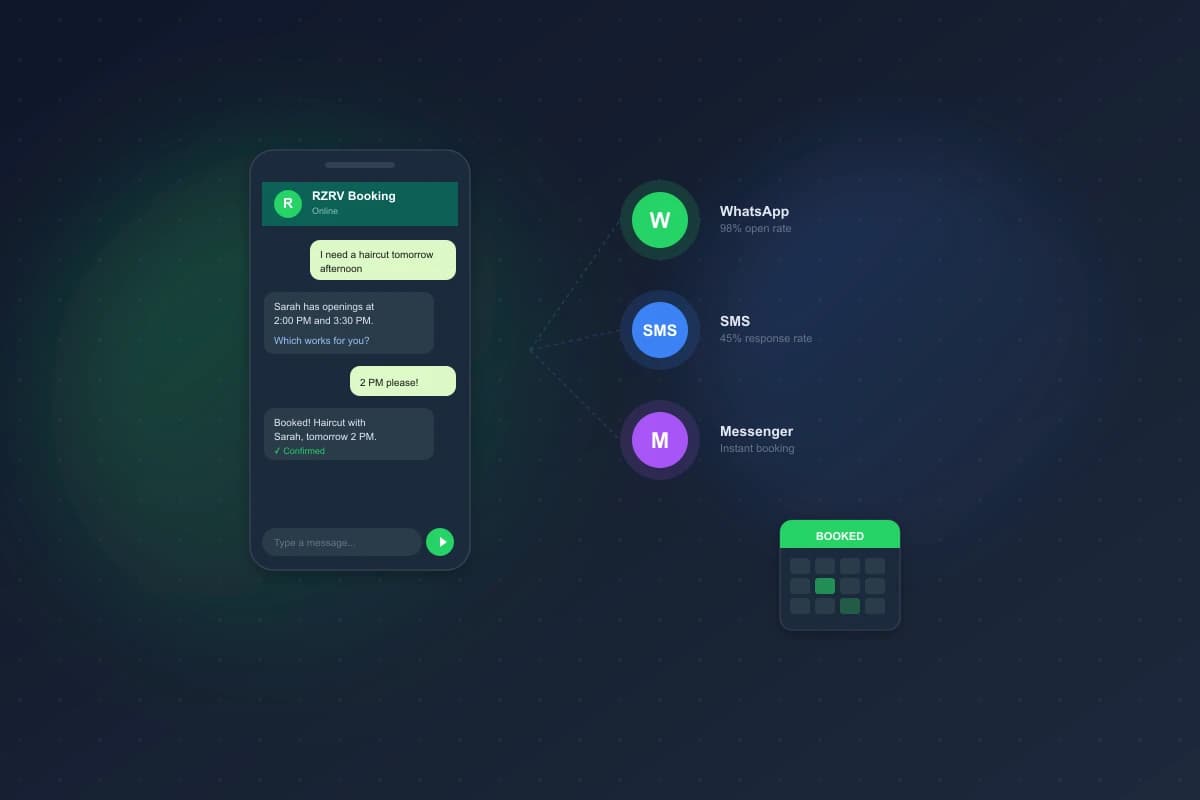
| SMS | 98% | 45% | 90 seconds |
| 98% | 40-50% | Under 2 minutes |
When you send a booking confirmation or reminder via WhatsApp, 98% of recipients actually see it. Compare that to email, where 4 out of 5 messages go unread. WhatsApp appointment reminders reduce no-shows by 52% — roughly 3.2x faster confirmation response than email.
For appointment-based businesses, this isn't a nice-to-have. It's a fundamental shift in how you reach customers.
How conversational AI makes messaging booking work
Letting customers message you is easy. Responding to every message manually at scale is not. A single staff member can handle maybe 20-30 booking conversations per day. An AI assistant handles thousands — simultaneously, 24/7, in multiple languages.
Here's how conversational AI transforms messaging from a communication channel into a booking channel.
Natural language understanding
When a customer sends "I need a massage next Thursday, preferably afternoon," the AI parses:
- Service: massage
- Date: next Thursday
- Preference: afternoon time slots
It checks your calendar, finds available slots, and responds: "We have openings at 1:00 PM, 2:30 PM, and 4:00 PM next Thursday. Which works best for you?"
No dropdowns. No date pickers. No form fields. Just a conversation.
Context retention
Unlike a booking form that resets if you close the tab, a messaging conversation persists. A customer can say "Actually, make it Friday instead" and the AI adjusts without starting over. They can come back three hours later and pick up where they left off.
This is especially powerful for complex bookings. A salon customer might need a cut, color, and blowout — three services that need to be sequenced correctly. In a form, that's three separate selections with duration calculations. In a message, it's: "I want the works — cut, color, and blowout."
Multi-language support
WhatsApp is global, and so are many service businesses. An AI booking assistant can handle conversations in English, Spanish, Portuguese, Arabic, and dozens of other languages — automatically detecting the customer's language and responding in kind. No separate booking pages for each language. One conversation, any language.
The WhatsApp Business API: what you need to know
WhatsApp offers two tiers for businesses. Understanding the difference matters.
WhatsApp Business App (free)
Designed for small businesses. You get a business profile, quick replies, labels, and a product catalog. But you're limited to one device, no API access, and no automation beyond basic auto-replies. Fine for a solo practitioner handling a handful of bookings. Not scalable.
WhatsApp Business API (paid)
This is where real booking automation lives. The API allows:
- Programmatic messaging. Send and receive messages through your booking system, not a phone.
- Chatbot and AI integration. Connect conversational AI to handle booking flows automatically.
- Template messages. Send pre-approved appointment confirmations, reminders, and follow-ups.
- Rich media. Share images, documents, location pins, and interactive buttons.
- Multi-agent support. Multiple team members can manage conversations from one number.
The API requires a Business Solution Provider (BSP) — companies like Twilio, MessageBird, or Infobip that provide the infrastructure. Pricing is per-conversation, typically $0.02-0.08 depending on the region and conversation type.
80% of large enterprises plan to adopt the WhatsApp Business API for customer service. If you're a service business and haven't explored this channel, you're leaving bookings on the table.
Beyond WhatsApp: SMS, iMessage, and multi-channel booking
WhatsApp dominates globally, but messaging preferences are regional. In the United States, SMS is still king. In China, it's WeChat. In South Korea, KakaoTalk.
The smartest approach isn't betting on one channel — it's building a multi-channel booking system that meets each customer on their preferred platform.
SMS booking
SMS has the broadest reach — every phone supports it, no app required. For businesses in markets where WhatsApp penetration is lower (like the US), SMS is often the primary messaging channel. The 98% open rate applies here too. And 84-86% of consumers have already opted in to receive texts from businesses.
An AI-powered SMS booking flow works the same as WhatsApp: the customer texts their intent, the AI responds with availability, and the booking is confirmed — all within the thread.
Facebook Messenger and Instagram DMs
For businesses that acquire customers through social media, enabling booking directly in Messenger or Instagram DMs removes a critical conversion barrier. A customer sees your post, taps "Message," and books without ever leaving the app.
This is particularly effective for beauty, wellness, and fitness businesses where discovery often happens on Instagram. The booking happens in the moment of intent, not 20 minutes later when the customer remembers to visit your website.
The unified inbox
Managing five messaging channels separately is a nightmare. The key is a unified inbox — one dashboard where all conversations from WhatsApp, SMS, Messenger, Instagram, and web chat converge. Your AI handles the booking flow identically regardless of channel. Your staff sees everything in one place.
Setting up WhatsApp booking for your business: a practical guide
Here's how to go from zero to accepting bookings via WhatsApp.
Step 1: Get a WhatsApp Business API account
Choose a BSP (Business Solution Provider) like Twilio, MessageBird, or 360dialog. You'll need:
- A dedicated phone number (can be a new number or your existing business line)
- Business verification through Meta (Facebook's parent company)
- A business website with matching information
Verification typically takes 2-7 business days.
Step 2: Connect your booking system
Your booking system needs to integrate with the WhatsApp API to:
- Receive incoming messages
- Check real-time availability
- Create bookings in your calendar
- Send confirmations and reminders
With platforms like RZRV, this integration is built in. Your AI booking assistant connects to WhatsApp, and your calendar, services, and staff availability are automatically synced.
Step 3: Set up message templates
WhatsApp requires pre-approved templates for outbound messages (messages you initiate). Common templates for booking businesses:
- Appointment confirmation: "Your appointment for on at is confirmed."
- Reminder (24h before): "Reminder: You have tomorrow at . Reply YES to confirm or CHANGE to reschedule."
- Follow-up: "Thanks for visiting! Ready to book your next appointment?"
Templates go through Meta's review process, usually approved within 24 hours.
Step 4: Train your AI on your services
Configure your AI assistant with:
- Your service menu (names, durations, prices)
- Staff members and their specializations
- Business hours and holiday schedules
- Booking rules (minimum notice, cancellation policy, buffer times)
The AI uses this configuration to have informed conversations. When a customer asks "How much is a deep tissue massage?", it knows. When they ask "Who's good with curly hair?", it can recommend the right stylist.
Step 5: Promote your WhatsApp booking channel
The best booking system in the world is useless if customers don't know about it. Add your WhatsApp number to:
- Your website (with a click-to-chat link:
https://wa.me/your-number) - Your Google Business Profile
- Your social media bios
- Your email signature
- In-store signage with a QR code
WhatsApp's wa.me links make it frictionless — one tap opens a conversation with your business.
Real-world results: what businesses are seeing
The data from businesses that have adopted messaging-based booking is compelling:
- Sephora achieved a 64% appointment booking rate through their WhatsApp concierge strategy.
- Healthcare providers using WhatsApp for scheduling saw a 52% reduction in no-shows. In India, 52% of private healthcare providers now use WhatsApp for appointment management.
- Travel agencies report that 55% of their booking confirmations now happen through WhatsApp.
- Service businesses overall see 45% more repeat bookings when they offer messaging-based scheduling.
These aren't marginal improvements. They're step-change gains that come from removing friction at the exact moment a customer wants to book.
Common concerns (and why they shouldn't stop you)
"My customers aren't on WhatsApp"
They might not be — but they're on some messaging platform. The principle is the same whether it's WhatsApp, SMS, or Messenger. Start with the channel your customers already use. If you're in the US, that's probably SMS. If you're serving an international clientele, WhatsApp is almost certainly the right choice.
"I don't want customers messaging me at all hours"
They already are — you're just not responding. An AI assistant handles after-hours messages automatically. The customer gets an immediate response and a booked appointment. You wake up to a full calendar. After-hours bookings typically account for 35% of total bookings when messaging channels are available — that's revenue you're currently losing.
"What about HIPAA / data privacy?"
WhatsApp Business API supports end-to-end encryption, and compliant BSPs offer HIPAA-ready configurations for healthcare. The key is choosing the right infrastructure partner and configuring data retention policies that match your regulatory requirements.
"Setting this up sounds complicated"
It was, two years ago. Today, platforms like RZRV handle the integration layer. You connect your WhatsApp number, configure your services, and the AI booking assistant handles the rest. Most businesses are live within a day.
The shift is already happening
Customers don't want to navigate your website to book an appointment. They don't want to download your app. They want to send a message — the same way they'd text a friend — and have it handled.
Messaging-based booking isn't a future trend. It's a current reality that's growing 15% year-over-year. The businesses that offer it are capturing bookings their competitors are losing to friction.
The question isn't whether your customers want to book via messaging. They already do. The question is whether you're set up to let them.
FAQ
Can customers really book appointments over WhatsApp?
Yes. With conversational booking, a customer messages your business, picks a service and time, and confirms — all inside the chat. RZRV does this across WhatsApp, SMS, and the web.
Is WhatsApp booking better than a booking form?
For many businesses, yes. Messaging has a ~98% open rate versus ~20% for email, and booking inside an existing conversation removes the friction of finding and filling out a form — so fewer bookings get abandoned.
Do I need a separate app to take bookings on WhatsApp?
No. The booking logic lives in your scheduling system; WhatsApp is just the channel. RZRV connects your real calendar, so a slot booked by chat is the same slot your calendar protects.